Table of Contents: Signs of a Fake Website
- Introduction to Signs of a Fake Website
- Signs of a Fake Website in Suspicious URLs
- Signs of a Fake Website Through Unrealistic Offers
- Signs of a Fake Website in Payment Methods
- Signs of a Fake Website in Poor Design
- Signs of a Fake Website in Missing Contact Details
- Signs of a Fake Website in Reviews and Testimonials
- Signs of a Fake Website Through Security Warnings
- How to Check a Website Before Trusting It
- Conclusion: Stay Safe from Fake Websites
Introduction to Signs of a Fake Website
Signs of a Fake Website can help you identify online scams before you share personal information, enter payment details, or download suspicious files. Fake websites often imitate trusted businesses, online stores, banks, and popular services to make visitors believe they are using a legitimate platform. Some look professional, making it difficult to recognize the danger immediately.

Learning to recognize these warning signs is an important step toward safer internet browsing. A suspicious website may use an unusual web address, advertise unbelievable discounts, display fake customer reviews, or pressure visitors to make quick decisions.
However, one warning sign alone does not always prove that a website is fraudulent. New businesses may have limited reviews, and legitimate websites can have design problems. The safest approach is to check several indicators, verify the website through independent sources, and avoid sharing sensitive information until you are confident that the site is genuine.
1. Signs of a Fake Website in Suspicious URLs
One of the first signs of a fake website is an unusual or misleading domain name. Scammers sometimes create addresses that resemble well-known brands but contain extra words, misspellings, or different domain endings.
For example, a fraudulent address might replace a letter in a company’s name or add words such as “secure-login” to make the page appear official. These small changes can be easy to overlook when someone is browsing quickly.
How to Check URLs for Signs of a Fake Website
Examine the complete web address before entering any information. Check the spelling of the domain and make sure it matches the official website you intended to visit. Be especially careful with links received through unexpected emails, text messages, or social media advertisements.

A padlock symbol or HTTPS connection does not guarantee that a website is legitimate. It indicates that the connection is encrypted, but scammers can also obtain HTTPS certificates.
Helpful tip: If a message claims to come from your bank or another important service, open the official app or type the known website address yourself instead of following the supplied link.
2. Signs of a Fake Website Through Unrealistic Offers
Extremely low prices and unbelievable promotions can be another warning sign. Fake online stores may advertise expensive electronics, designer products, or popular accessories at prices far below normal market levels.
These offers are designed to create excitement and encourage visitors to purchase before checking the seller’s credibility. Some fraudulent websites also display countdown timers or messages claiming that only a few items remain.
Why Unrealistic Discounts Are Signs of a Fake Website
A genuine business can offer discounts, especially during seasonal sales. However, an offer that appears unusually generous deserves additional investigation.
Compare prices with established retailers, check the seller’s reputation, and read the return and refund policies. Look for a verifiable business address and independent customer feedback.
Do not let urgency replace careful judgment. A genuine promotion should not require you to ignore basic safety checks.
3. Signs of a Fake Website in Payment Methods
Payment options can reveal important information about an online seller. Some fraudulent websites insist on irreversible payment methods, request direct transfers to unfamiliar personal accounts, or pressure customers to pay through unusual channels.
Once money has been transferred through certain payment methods, recovering it may be difficult. This is why checking payment arrangements before completing a purchase is essential.
Safe Payment Checks for Signs of a Fake Website
Before paying, confirm that the seller is genuine and review the available payment protections. Credit cards and reputable payment services may provide dispute procedures, although protection varies by provider, country, and transaction type.
Avoid sharing your banking password, one-time verification codes, or other authentication information with a seller. Legitimate merchants generally do not need your account password to process a purchase.
If a website demands immediate payment through an unfamiliar or irreversible method, stop and investigate before proceeding.
4. Signs of a Fake Website in Poor Design
A poorly designed website can sometimes indicate a problem, particularly when combined with other suspicious details. Fraudulent websites may contain copied logos, blurry images, broken links, inconsistent fonts, strange wording, or unfinished pages.
Some scammers copy entire websites to make their platforms appear trustworthy. As a result, professional design does not automatically prove that a business is genuine.
Website Quality Checks for Signs of a Fake Website
Look beyond appearance and examine the details. Check whether the company name remains consistent across the website, whether product descriptions make sense, and whether important pages work correctly.
Search for copied text or images when something seems suspicious. You can also compare the website with the official company’s known online presence.
Poor grammar or broken links are warning signs, not conclusive proof of fraud. Combine these observations with domain checks, independent reviews, and verified contact information.
5. Signs of a Fake Website in Missing Contact Details
Reliable businesses usually provide ways for customers to ask questions or resolve problems. Depending on the business, this might include a support email, telephone number, physical address, or clear customer service page.
A website that provides no meaningful contact information may be risky, especially if it requests payment or sensitive personal details.
Verify Business Details for Signs of a Fake Website
Check whether the listed business address exists and whether the company name matches independent business records where available. Look for clear shipping, refund, privacy, and cancellation policies.
Be cautious if the contact information belongs to an unrelated business or if the website provides only a generic form with no other details.
Keep in mind that small online businesses may operate without a public telephone number. Missing contact information becomes more concerning when combined with unrealistic offers, suspicious payment requests, or other inconsistencies.
6. Signs of a Fake Website in Reviews and Testimonials
Customer reviews can help you assess a business, but they are not always reliable. Scammers may publish invented testimonials, copy reviews from other companies, or create multiple accounts to make a website appear popular.
A page filled with perfect five-star reviews and little meaningful detail may deserve closer inspection.
How to Verify Reviews for Signs of a Fake Website
Search for the business name alongside terms such as “complaint,” “scam,” or “refund problems.” Look for independent reviews on established platforms rather than relying only on testimonials displayed on the seller’s own website.
Read both positive and negative experiences. Detailed reviews that describe specific purchases and realistic outcomes may provide more useful information than repeated comments containing generic praise.
No single review proves that a website is fraudulent. Focus on consistent patterns across several independent sources, and remember that reviews can also be manipulated to unfairly damage legitimate businesses.
7. Signs of a Fake Website Through Security Warnings
Fake websites may attempt to collect passwords, payment information, identity details, or other private data. Some may also encourage visitors to download malicious files or install suspicious browser extensions.
Browser security warnings should always be taken seriously. If your browser identifies a website as dangerous, do not ignore the warning simply because the page looks familiar.
Protect Your Information from Signs of a Fake Website
Use unique passwords for important accounts and enable multifactor authentication whenever possible. A password manager can help you recognize unexpected domains because it generally will not autofill credentials on a different website.
Never install software or browser extensions merely because an unfamiliar website tells you to do so. Download applications from trusted official sources, and keep your browser and operating system updated.
If you believe you have entered a password on a fraudulent website, visit the genuine service directly, change the affected password, and review your account activity. If you submitted payment information, contact your bank or payment provider promptly.
8. How to Check a Website Before Trusting It
Recognizing the signs of a fake website is easier when you follow a consistent verification process.
First, inspect the complete domain name and check for spelling differences. Next, search for independent information about the business, including complaints and credible reviews. Review the contact details, refund policy, and payment options before making a purchase.
You can also use reputable website reputation services, such as Google Safe Browsing’s site status tool, to check whether a website has been identified as unsafe. These tools are helpful but cannot guarantee that a site is legitimate, particularly if it is new or has not yet been reported.
For suspicious links, avoid opening them directly. If the link claims to come from a trusted organization, navigate to that organization’s official website independently.
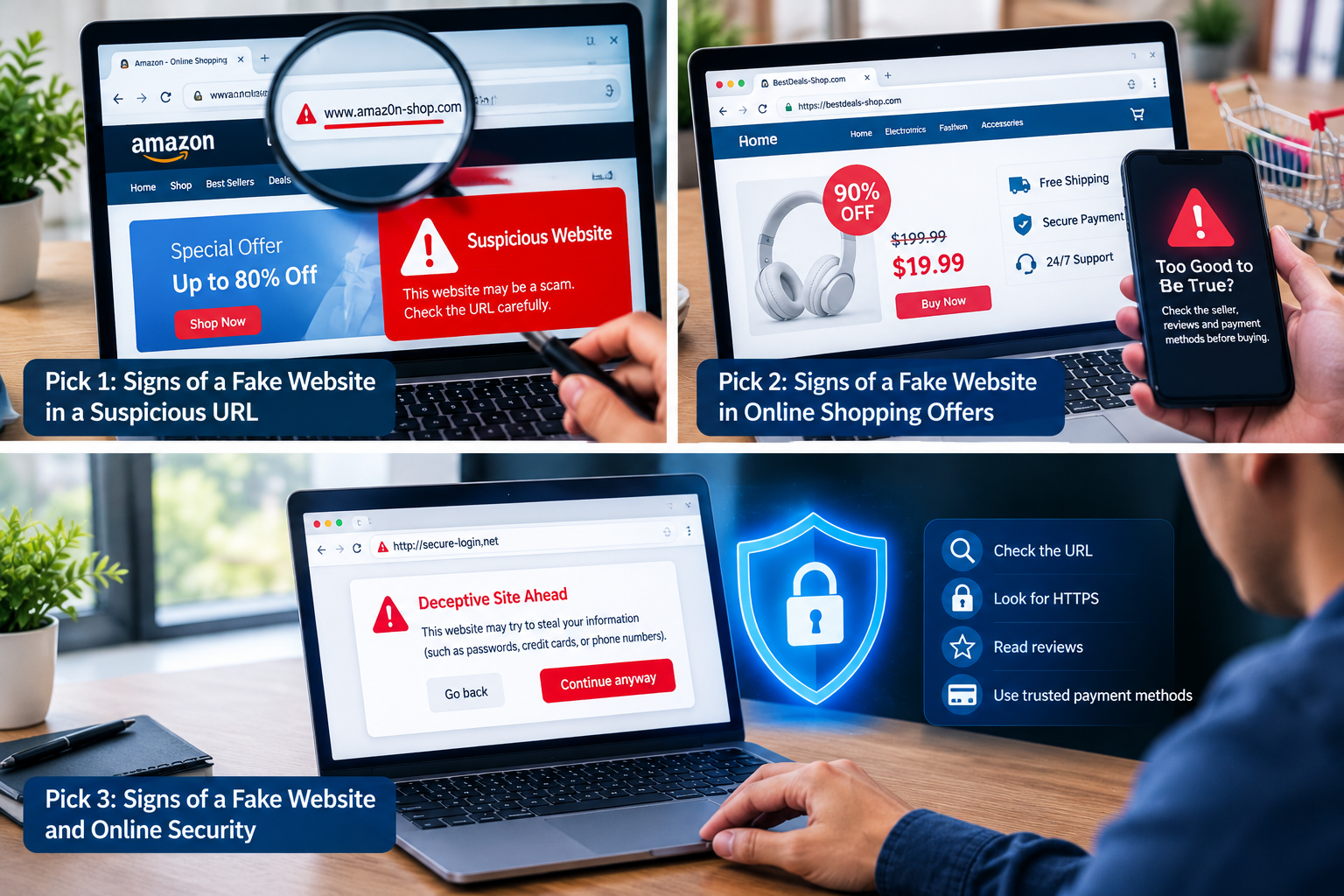
Three Related Picture Ideas for Signs of a Fake Website
Pick 1: Signs of a Fake Website in a Suspicious URL
Image prompt: Create a realistic cybersecurity-themed image showing a laptop browser with a suspicious imitation web address, a warning symbol, and a magnifying glass inspecting the URL. Use a professional technology-blog style with a clean background and clear visual focus.
Alt text: Signs of a fake website in a suspicious URL.
Pick 2: Signs of a Fake Website in Online Shopping
Image prompt: Create a realistic online shopping scene showing an attractive but suspicious discount website on a laptop, with an unusually low price, a warning icon, and a shopper checking the seller’s credibility. Use a polished e-commerce cybersecurity illustration.
Alt text: Signs of a fake website in suspicious online shopping offers.
Pick 3: Signs of a Fake Website and Online Security
Image prompt: Create a professional cybersecurity illustration featuring a browser window, a shield and padlock, a suspicious link, and a person verifying website details before entering personal information. Use a modern blue technology aesthetic.
Alt text: Signs of a fake website and ways to stay safe online.
9. Comparison Table of Signs of a Fake Website
The following table summarizes common warning signs and practical ways to investigate them.
| Warning sign | What to check | Safer action |
|---|---|---|
| Suspicious URL | Misspellings or misleading domains | Visit the official website directly |
| Unrealistic offers | Prices far below normal levels | Compare established sellers |
| Unusual payments | Irreversible or unfamiliar methods | Use trusted payment options |
| Poor website quality | Copied content or broken pages | Verify the business independently |
| Missing contact details | No meaningful support information | Check independent business records |
| Suspicious reviews | Repeated or generic testimonials | Read independent reviews |
| Security warnings | Browser alerts or unsafe downloads | Leave the site and verify its safety |
10. Graph: Warning Signs of a Fake Website
The following graph uses an illustrative risk-priority score, not measured scam statistics. It demonstrates how a reader might prioritize further investigation when encountering several warning signs.
| Warning sign | Illustrative priority score out of 5 |
|---|---|
| Suspicious URL | 5 |
| Unusual payment request | 5 |
| Browser security warning | 5 |
| Unrealistic offers | 4 |
| Missing contact details | 3 |
| Suspicious reviews | 3 |
| Poor website design | 2 |
These scores are a simple educational example, not a validated fraud-detection system. A browser security warning or suspicious payment request deserves urgent attention, while design flaws alone are weaker evidence. Multiple warning signs together should prompt greater caution.
Conclusion: Recognize Signs of a Fake Website and Stay Safe
Learning the signs of a fake website can help you protect your money, accounts, and personal information. Suspicious URLs, unrealistic discounts, unusual payment requests, missing contact details, misleading reviews, and browser security warnings are all reasons to investigate before trusting a website.
Remember that no single indicator can confirm every scam, and a polished design or HTTPS connection does not prove that a business is legitimate. Verify important details independently, use trusted payment methods, and avoid sharing sensitive information with unverified websites.
By taking a few moments to check a website before clicking, downloading, signing in, or paying, you can make safer decisions and reduce your exposure to common online scams.